PubMed Lookups Live
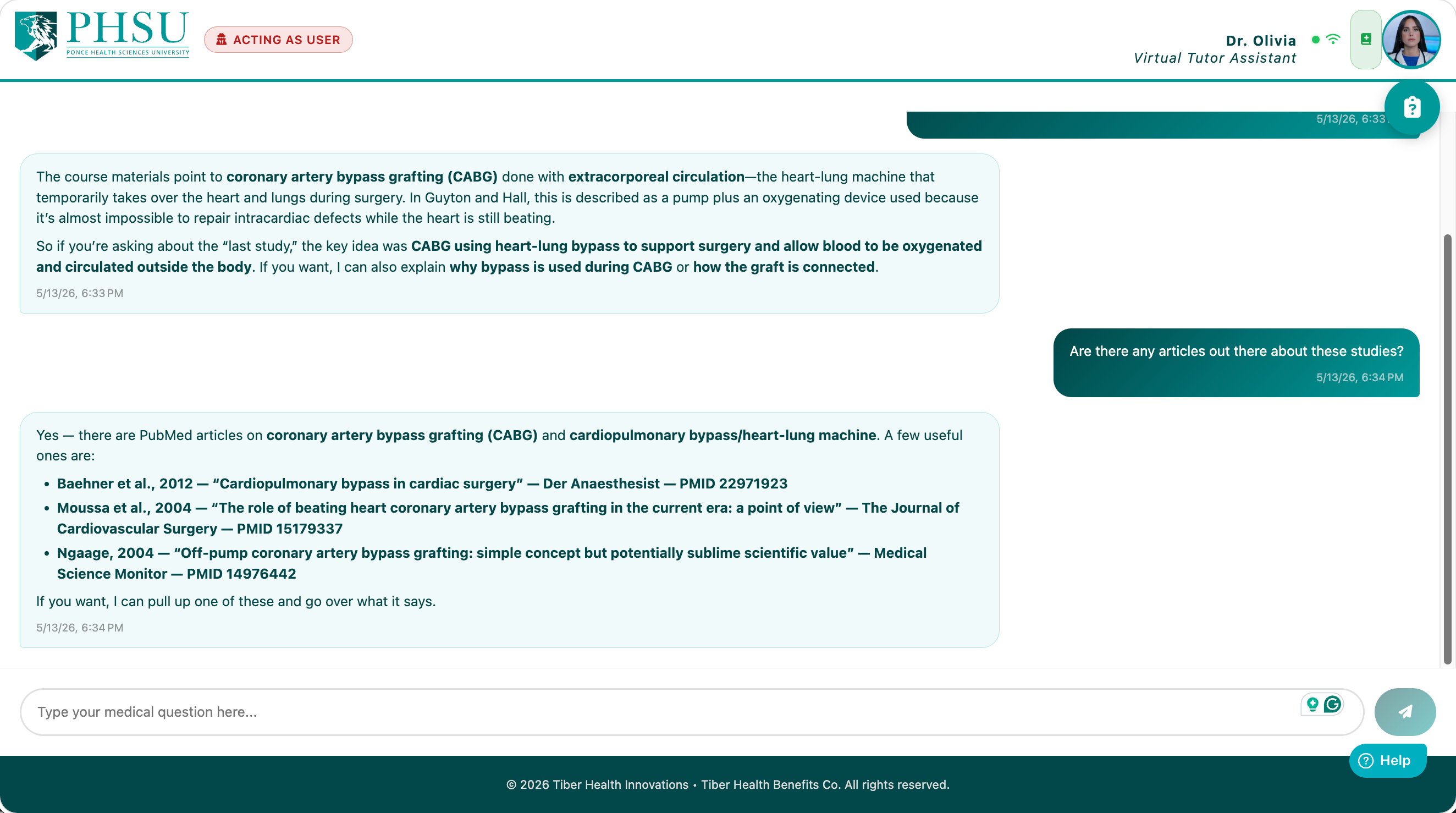
Dr. Olivia can search the National Library of Medicine's PubMed database in real time. When a question calls for current biomedical literature — the latest study on a treatment, a meta-analysis, a landmark trial, or a guideline citation — she'll search PubMed and fold the results into her answer with the citations attached.
When She'll Reach for PubMed
- "What does the recent literature say about…" — she'll search and summarize.
- "Is there a study supporting…" — she'll find it (or tell you what she found instead).
- "Cite a source for…" — she'll attach the title, authors, and PubMed link.
- "Compare the evidence for X vs. Y" — she'll search both, then compare.
- Anytime she's making a clinical claim that benefits from a reference — she'll volunteer one.
Things You Can Ask
- "What does the latest evidence say about SGLT2 inhibitors in heart failure with preserved ejection fraction?"
- "Find me a meta-analysis on early mobilization after hip fracture surgery."
- "What's the recommended first-line treatment for community-acquired pneumonia in 2025? Cite a source."
- "Are there any recent reviews on the use of GLP-1 agonists outside of diabetes?"
What She'll Show You
For each citation, you'll typically see:
- Title of the article.
- Authors (first author plus "et al." for long lists).
- Journal, year — so you can judge recency and credibility at a glance.
- PMID — the PubMed identifier, often clickable to open the abstract.
- A short summary in Dr. Olivia's own words, framed for your question.
Personal API Key (optional, recommended)
By default, Dr. Olivia shares a single PubMed access pool across all students. That's fine for casual use, but during exam prep weeks the shared pool can hit its rate limit and your lookups slow down.
You can plug your own free PubMed API key into My
Settings → PubMed.PersonalApiKey. With a personal key:
- Your lookups don't share the rate limit with other students — they go straight through.
- You get the full higher per-second quota that NCBI grants to authenticated users.
- The PubMed badge appears below Dr. Olivia's portrait on the Selection page so you know the personal key is active.
Getting a free PubMed API key
- Sign in (or create an account) at ncbi.nlm.nih.gov/account.
- Open Account Settings → API Key Management.
- Click Create an API Key. NCBI generates a long alphanumeric string.
- Copy that string into My Settings →
PubMed.PersonalApiKeyand click Save All. - Sign in again so the new key takes effect.
What PubMed Won't Do for You
- Replace UpToDate or your textbooks. PubMed indexes primary literature; it's not a clinical-decision-support tool. Dr. Olivia will recommend cross-checking against your course materials and faculty for clinical work.
- Give you full-text articles. She can read the abstract; the full PDF requires institutional access through your library.
- Find non-medical literature. PubMed is biomedical/life-sciences only. For broader academic search, she'll redirect to other tools.
- Guarantee currency. A study from 2008 may still appear in results for some queries; always check the publication year before quoting it as "recent."
Troubleshooting
| Symptom | What's likely happening |
|---|---|
| "PubMed is busy — let me try a moment." (you hear this twice) | The shared rate limit is saturated. Adding a personal API key (above) eliminates this. |
| "I couldn't find a great match for that question." | Try rephrasing with more specific terms, or ask for a related concept. PubMed is literal — it indexes the exact words in titles and abstracts. |
| The PubMed badge doesn't appear after saving your key. | Sign in again — settings only take effect on a fresh sign-in. |